

We describe the basic planning capabilities in SAP Analytics Cloud that are not available in the standard S/4HANA mechanisms or in the Fiori interface. In the following section, we walk you through the process of exporting data to the system using a financial plan as an example. In the final section, we demonstrate how to manage a plan imported into S/4HANA using the Fiori interface.
Planning in SAP Analytics Cloud
Planning in SAP Analytics Cloud involves more than just defining a planning model—that is, specifying the dimensions and metrics to be included in the planning process—and entering planned values in the appropriate form. Below are the key features of planning in SAP Analytics Cloud:
- The ability to import master and transaction data from multiple systems, databases, or file sources. Both actual and planned data can be imported, which can then be used to create new plans or comparative reports. In the case of S/4HANA, actual data comes from only one system, and only plans can be imported additionally from a file;
- It is possible to create private and public versions of plans;
- Simulations using the so-called “value driver tree,” which graphically illustrates how a change in one of the planned metrics will affect the others;
- Defining authorization objects for entering and viewing specific planned values;
- The ability to use predictive models (time series and regression functions) as the basis for a plan for the next period;
- Data Actions—that is, complex formulas, calculations, allocations, conversions, and copying operations that can be performed manually or automatically at regular intervals;
- A built-in calendar that allows you to schedule specific activities over time, assign responsible parties, and send email reminders about uncompleted tasks;
- Workflow, which allows you to define a series of dependencies between individual planning tasks and specify the people responsible for implementing and verifying the plan;
- Integration with MS Excel, allowing for reporting and entering planned values directly from the spreadsheet;
- Reporting of planned and actual data in both tabular and graphical formats. It should be noted here that reporting in both planned and actual formats is also possible in the Fiori interface; however, on the S/4HANA side, the number of possible chart settings is very limited, and there is no option for R visualization or for presenting data on maps.
Planning in SAP Analytics Cloud
-
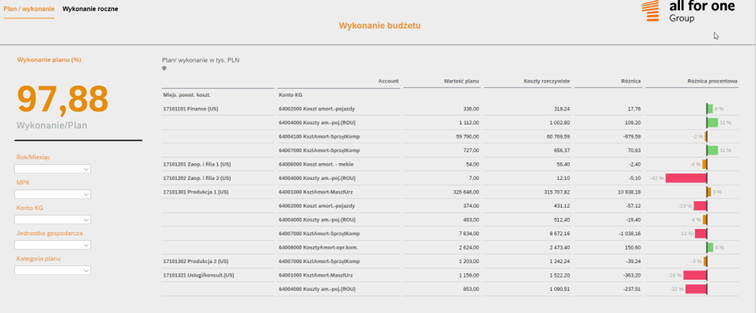
- Comparison of the Plan and Actual Results
-
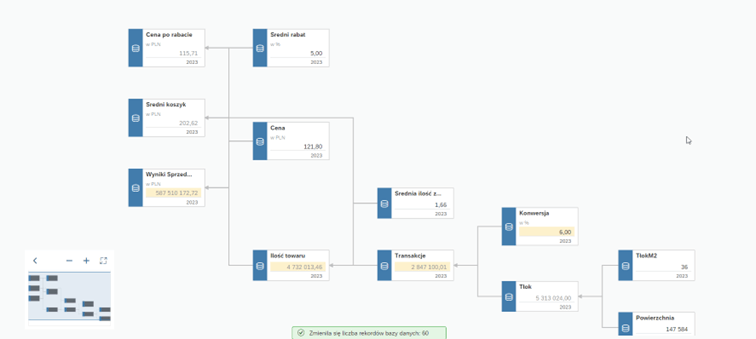
- Value Driver Tree
-

- Integration with MS Excel
-
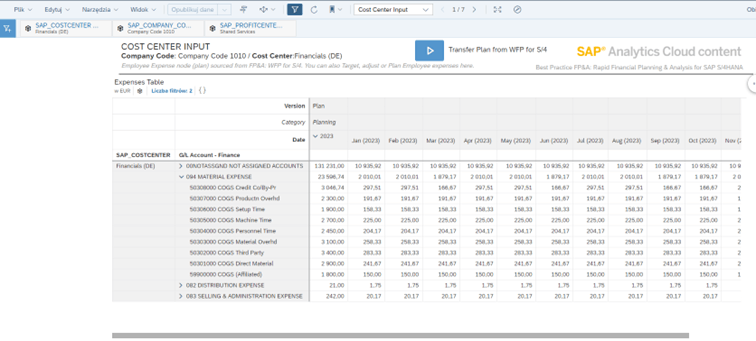
- Data Entry
Exporting Planned Data to S/4
Currently, SAP Analytics Cloud supports the export of planning data to:
- SAP BPC,
- SAP S/4HANA,
- OData services,
- files.
Data export, like data import, is performed from within a defined planning model in the Data Management section. When exporting data to SAP S/4HANA, an appropriate import connection to that system must be defined.
The first step is to select the appropriate table on the system side where the planned data is to be saved. Data can be exported to the following tables:
- ACCOSTRATE – activity rates used to allocate values based on labor-hours or machine time,
- FINSSKF – general ledger: statistical indicators,
- ACDOCP – planning data: individual items,
- ACDOCU – group reporting.
After selecting the appropriate table, the fields in the SAP Analytics Cloud data model are mapped to their counterparts in the S/4HANA table. At this stage, it is also possible to limit the data export to selected values of individual dimensions. Once the data export is initiated, the data will be loaded into the corresponding table on the system side. It is worth noting that such data exports can be performed periodically and automatically, according to a scheduled timeline.
Plan Management on the S/4HANA Side
Planned data on the S/4HANA side—including ACDOCP data stored in the table—can be fully managed in the Fiori interface. Specifically, a plan retrieved from SAP Analytics Cloud can be:
- delete,
- copy,
- reset,
- modify.
From the perspective of the Fiori interface, the management and editing capabilities for a plan imported from an external source are identical to those for a plan created directly in the S/4HANA system. However, we no longer have the conveniences listed above when making modifications.
Planning in SAP S/4HANA
-

- Modifying a Plan in S/4HANA
-
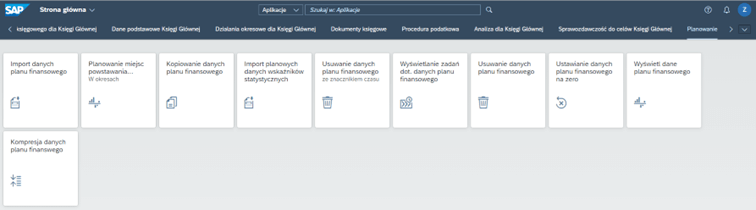
- Planning Applications in the Fiori Interface on the S/4HANA Side
-
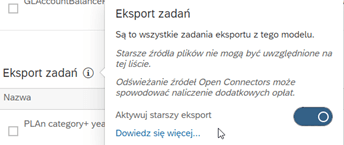
- Switching to the legacy export. Tip 1. It is possible that not all available systems for exporting planned data will be visible. In that case, you must enable the “legacy export” option. Tip 2. Similarly, not all of the tables mentioned—to which data can be saved in the S/4HANA system—may be available. In this case, you must enable the appropriate OData service on the SAP system side.
-
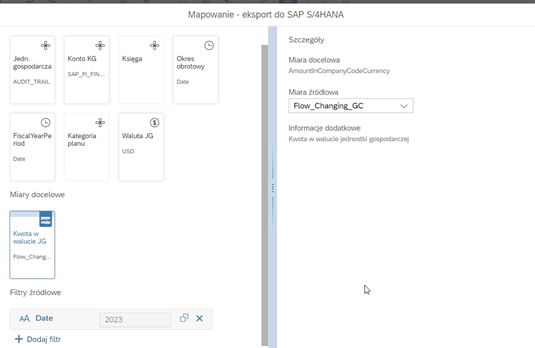
- Mapping Source and Target Fields
Thanks to the integration of SAC with S/4HANA, planned data, as well as reports that allow for a comparison of plan and actual performance, can be displayed both in analytical applications in SAP Analytics Cloud and in standard S/4HANA reports in the Fiori interface as part of Embedded Analytics.
At this point, one might ask: Why export planning data to S/4HANA? There may be many reasons, but two seem the most obvious. The first is the separation of responsibilities within the organization and the associated assignment of permissions. Not all users involved in day-to-day analysis need to be able to create a plan; they are only responsible for monitoring its execution.
The second reason is that the values planned for further calculations in the transaction system are used to derive specific values. All of this means that the capabilities of both systems complement each other.