

All for One ECM (currently Rockawork)
Rockawork is a platform that enables the digitization of many business processes. The low-code approach used enables advanced users to design processes themselves, without involving developers or external consultants, making it short and cost-effective to deliver the solution required by the business. In addition, the solution is available in the form of a mobile application, in which the user himself can lay out the layout of components on a smaller screen.
Many built-in features are used to make it easier to navigate and work with the solution.
- Search engine with two ways to search – classic (after typing a phrase, a list of results appears) and the ability to filter by predefined attributes;
- Export tables with search results to Excel;
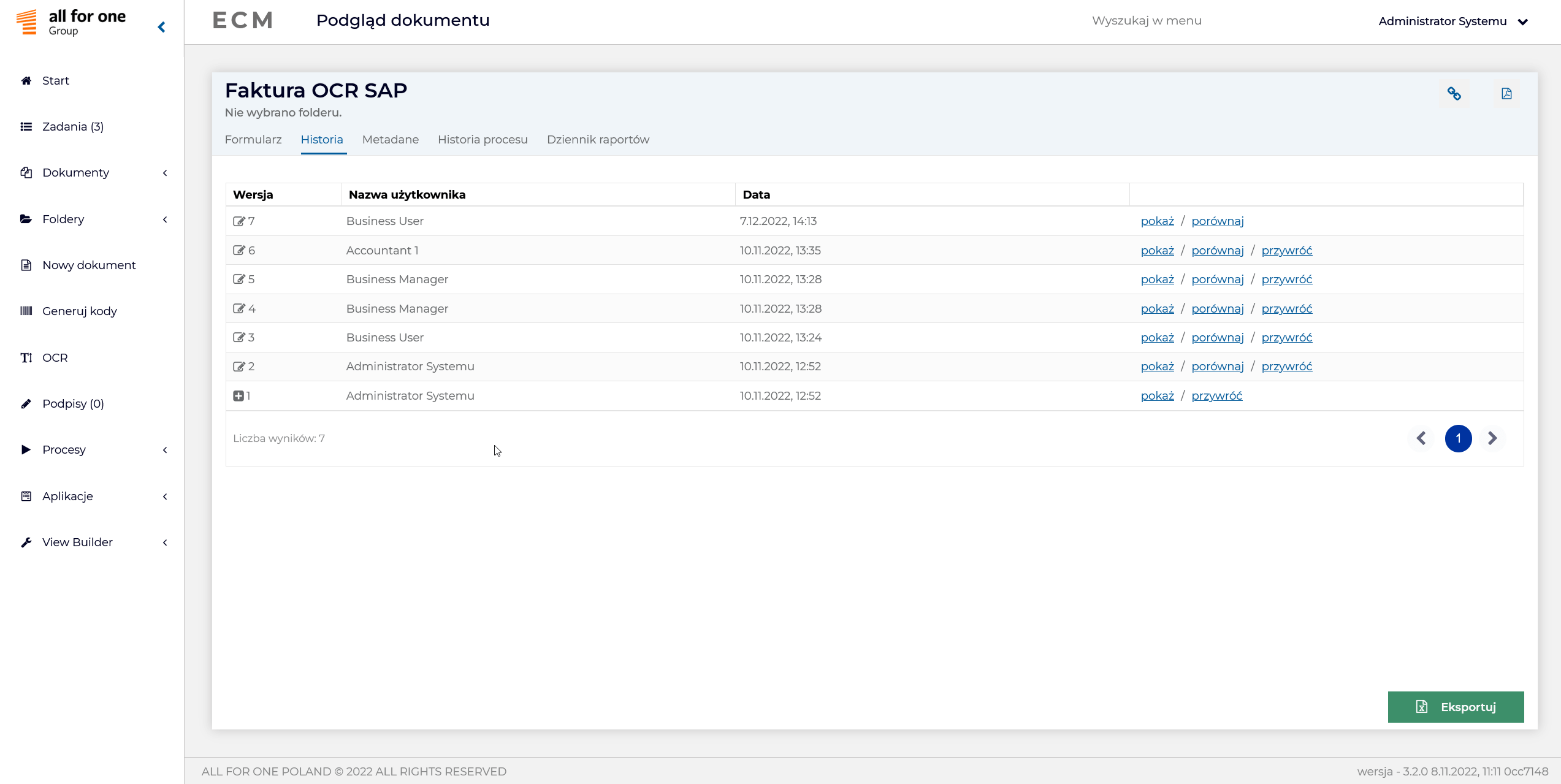
- Versioning, restoring, comparing documents (including Word);
- Built-in BPMN 2.0 notation editor for visual process mapping by users;
- Available process history for each document in visual form;
- Automatically save the scanned and tagged document to the appropriate place in the system (based on the generated barcode);
- Integration with qualified signatures, including the largest cloud-based qualified signature providers; ability to sign multiple documents directly into ECM at the same time;
- SMS and email notifications to inform or remind you to perform an action;
- Ability to create reports independently based on generic reports available in the system, function to share them with other users. In addition, integration with Power BI;
- Extensive integration capabilities with many business systems;
- Ability to use a proprietary RPA(Robotic Process Automation) tool for integration with SAP;
- Multilingual support;
- Document Repository (ECM Content Server).
Purchase invoices in ECM
-

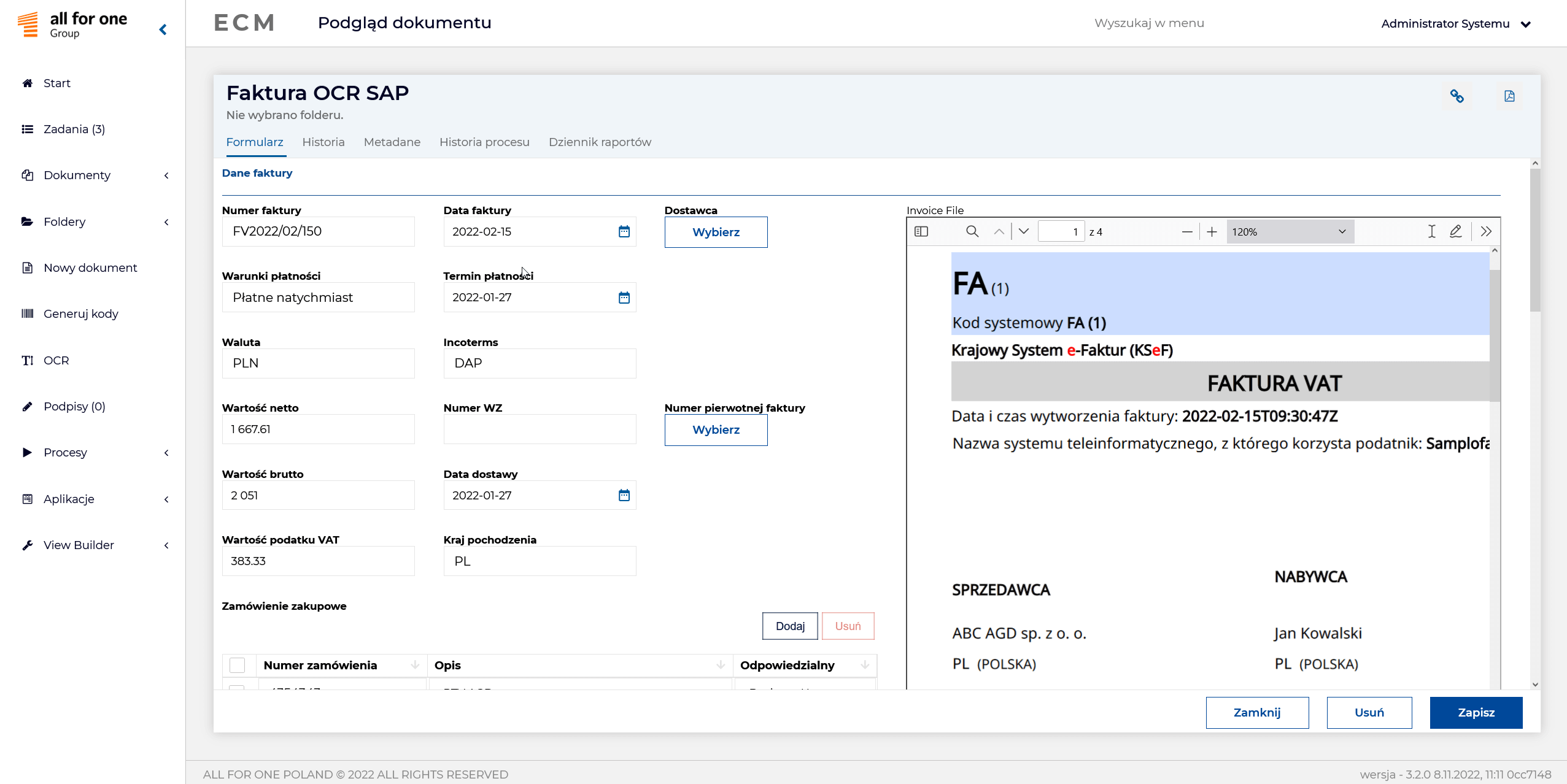
- Obraz faktury w repozytorium
-
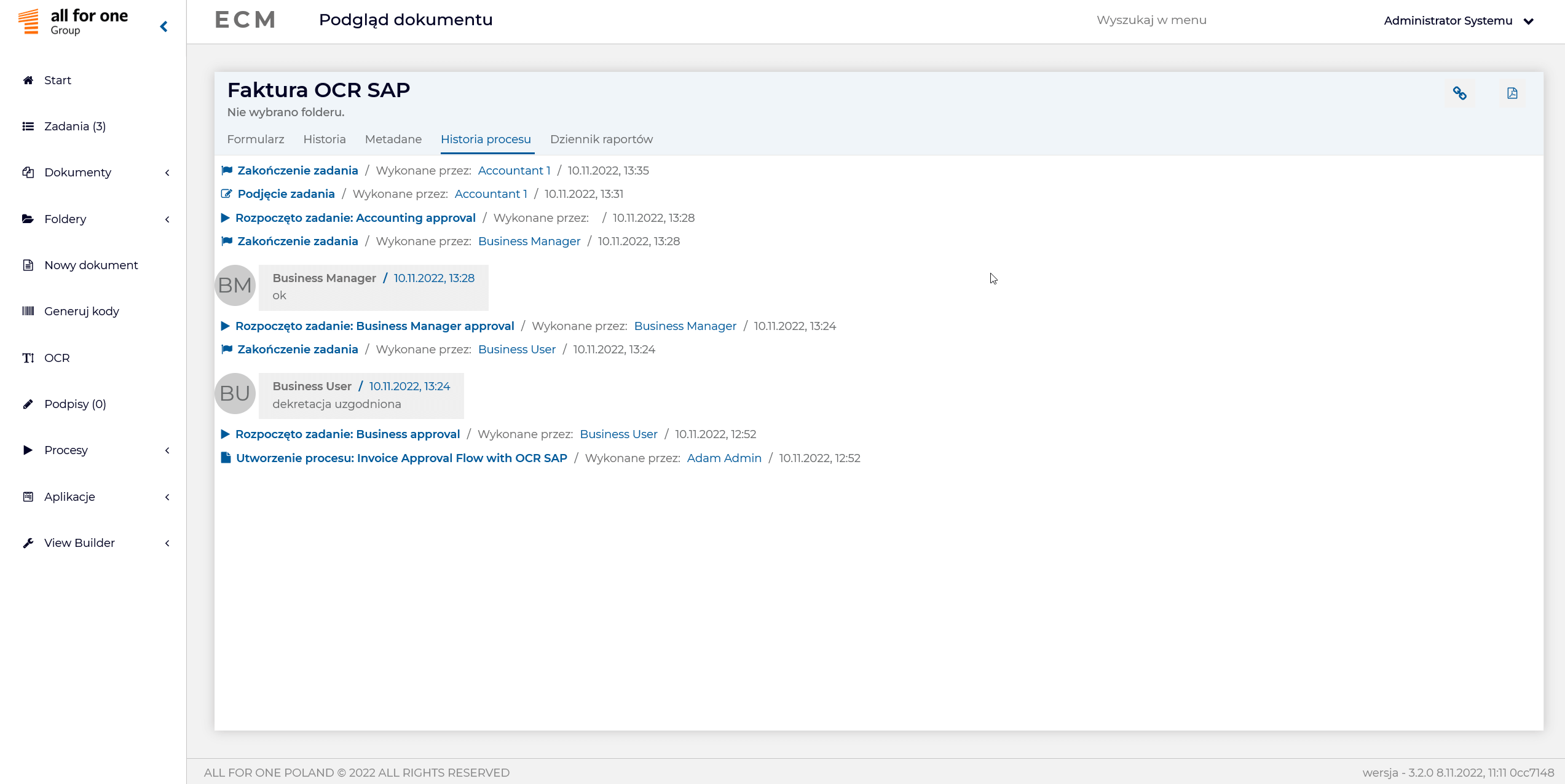
- Historia przetwarzania dokumentu w procesie
-
- Historia edycji dokumentu
-
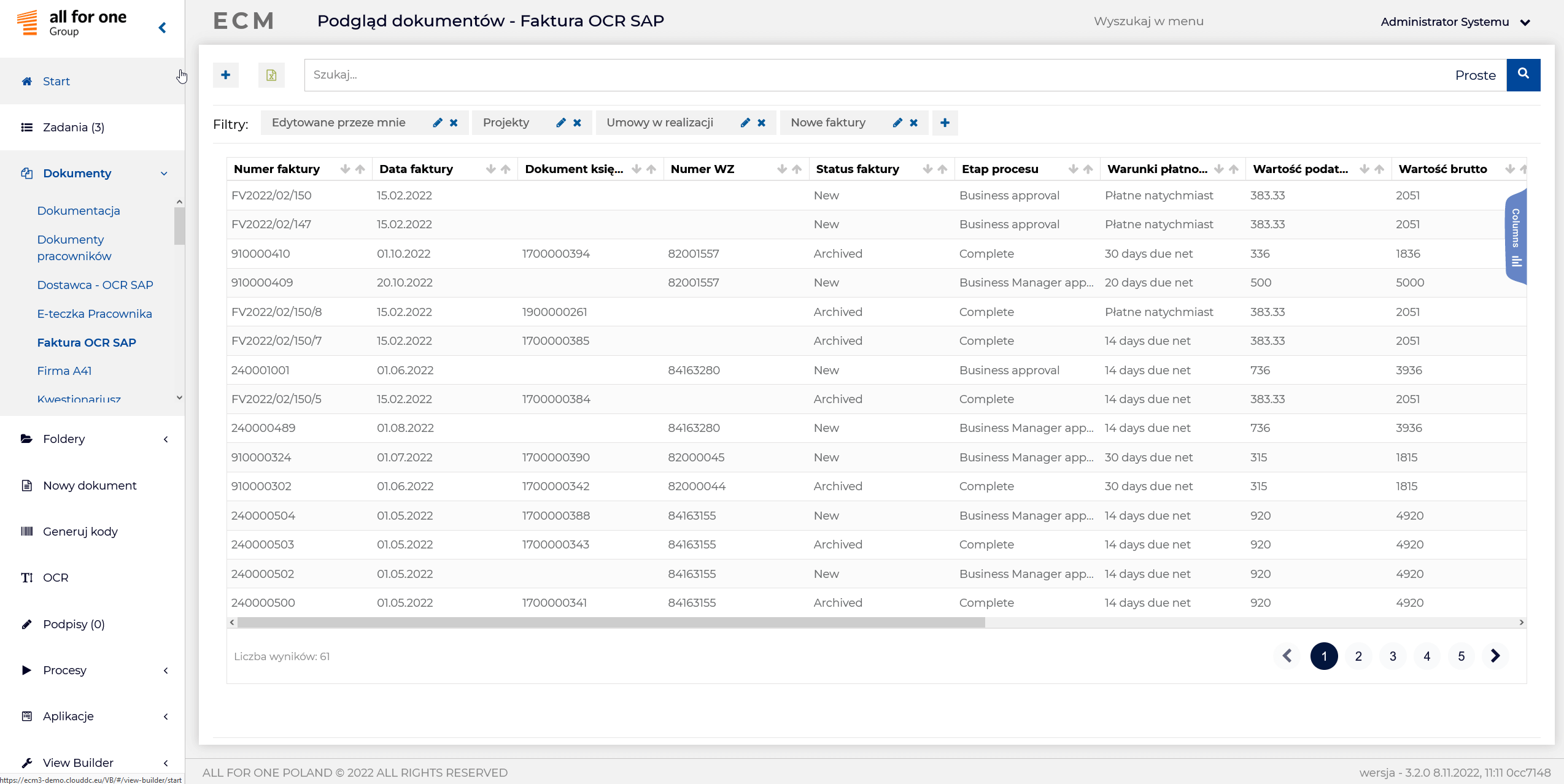
- Lista faktur w ECM
Purchase invoice from KseF in ECM
Presenting the workflow of a purchase invoice from a supplier in Rockawork, sent via the solution All for One KSeF from the Ministry of Finance and its posting in SAP.
The ECM system queries the KSeF Hub for invoices from our suppliers. The invoice retrieved from KSeF goes to the ECM system and is processed further. It is possible to model even a complex and multi-step document approval process. For the purpose of this article, we will describe a simple example, consisting of three basic steps.
The first step is substantive verification and cost decreeing by the responsible employee. Then the invoice is approved by the supervisor. In the background, an accounting document is automatically created in SAP using a robot (RPA) or interface. The final step is the accounting verification of the invoice and posting it in SAP.
The operation of the ECM system is very intuitive. On the left side there is easy access to the applications assigned to the user (e.g. workflow, tasks, documents, OCR, barcode generation, etc.). Tasks for the user are clearly visible, overdue tasks are highlighted in red.
The employee who accepts and verifies the invoice begins the task by entering edit. From this level, he sees a preview of the document and the relevant information necessary for substantive verification: accepted from KSeF, supplier, invoice number, net and gross value, invoice items. In the next step, he performs the invoice decrement. It is possible to decree to the appropriate MPK, to General Ledger accounts or to controlling orders. It is also possible to break one item into multiple MPKs or multiple orders, or to assign multiple General Ledger accounts to one item.
In addition, each user has a special field in which to enter relevant information or comments on the invoice. This information is visible to the next participant in the process. At each stage, we can see where the invoice is in the process at the moment. The possible endings: accept, reject or redirect to another person, are also fully customizable.
The next step is approval of the invoice by the supervisor. He also sees his task list. After entering the task, the supervisor has access to the same information about the invoice as the previous employee. If necessary, he can make changes to the decrement and leave his comments. Like any other participant in the process, he can view its progress.
We have moved one step forward in the process. We are at the stage of business approval of this invoice. At this stage, once it is accepted, an accounting document is automatically created in SAP.
The next step is accounting. A good practice is to create an accounting account in ECM and set up group tasks. In practice, this means that all users in the accounting department see all open and already processed invoices. Once a task is taken up by a person from the department, it disappears from the group task list, preventing duplication of work. Like the previous users, accounting sees all the relevant elements of that invoice, plus an additional one – the accounting document in SAP.
This is the final element in our model process, where the ECM tool’s involvement ends. The result is that the invoice goes through all the defined steps (the approval path can be much longer, depending on the conditions, e.g., the amount of the invoice), an accounting document is automatically created in SAP, and a trail is left in the form of a recorded history of the entire process, including information about the people involved, comments and the time each step took.
Integration with SAP is possible in various ways, depending on the customer’s needs (interface, bot). It is worth noting that physically the invoice is stored in ECM (ECM Content Server) and from this level it is previewed in SAP (PDF file). As a result, the system is not overloaded.
Integration of SAP and KSeF
Once the purchase invoice has been received in the SAP system, various approaches to integration with All for One KSeF are possible. We present the three most typical options.
The first is a minimum approach. Documents are automatically cycled from the All for Oen KSeF Hub and transferred to the environment in which we are currently working. These can be, for example, MIRO or FB 60 transactions. The system initially enters the header of the FI or MM document (along with the order/supply allocations). In the case of the MM document, it is important to read the .xml file with references to orders or deliveries and prepare them for manual posting. Further processing of the invoice is done as before (e.g., the currently implemented workflow or the All for One InvoiceFlow tool). Of course, the ability to generate an invoice view is crucial.
In this approach, accounting works in traditional SAP transactions. No additional licenses or bots are required. This is the fastest and easiest way to integrate with SKeF.
In the second variant, the maximum impact of the document into SAP is fully automated. The electronic structured invoice, in a sense, does the work of OCR, so that the processing of the document from the initial stage is automatic, including items and decrements. If certain boundary conditions are met, it is even possible to automatically post the invoice.
It should be noted, however, that there are quite a few of these conditions, for example, references must be written out in detail to the opposition, and a KSeF structured document by default has these references only in the header. Therefore, you can require the supplier to put the necessary information in an additional field on the item in the .xml document. Another solution is to set up heuristics, such as recognizing items by material or EAN number. The same is true for tax codes. There is potential to define them in orders, for example, and completely automate the process. However, this approach requires an SAP Indirect Access license or a bot implementation.
Hybrid approaches, combining both of the above options, are also possible, such as automatic posting of invoices only from a key bulk supplier with whom we have established standard rules of communication, and from the other contractors only the header is taken.
It is worth noting that in both approaches – minimum and maximum – the All for One KSeF solution is invisible to the user, running in the background. It can be integrated with the standard SAP workflow used in the company or another custom solution (e.g. All for One InvoiceFlow), to which it serves as a source of pre-entered documents.
The third approach is to use the All for One KSeF solution directly. It assumes cyclic automatic downloading of documents from KSeF Hub and then handling them directly in the KSeF Monitor (e.g. entering items, saving orders, tax codes, decrements). This is also where posting or initial invoice entry takes place. Of course, it is possible to generate an invoice view. No additional SAP licenses are required for this variant.
The challenge of fully integrating SAP with KSeF is the large number of variants of SAP MM configurations at customers and established accounting standards and rules.
Differences may be in the following areas:
Header Mapping:
- Date mapping: invoice date, VAT date (e.g., from the earliest acceptance to which the items relate);
- Invoice issuer mapping: mapping by TIN;
- Account number mapping – IBAN mapping to partner bank key;
- Mapping days to payments – mapping to a payment condition;
- Other fields: reference of the corrected document, header descriptions, split amount (e.g. split payment).
Position mapping:
- Mapping of order items: exact, based on order, based on material (EAN);
- Delivery item mapping: accurate, based on sequence, based on material (EAN);
- Tax rate mapping: from order items, based on determination tables;
- Mapping of the rate of the debit/debit invoice, quantity/value adjustment invoice.
Due to the large differences in configuration, we assume a flexible approach to integration projects, including the preparation of a tailor-made concept using processes already implemented in the organization (e.g. Rockawork, All for One InvoiceFlow, SAP Workflow or SAP Flexible Workflow available in S/4HANA). It is also possible to combine an All for One KSeF implementation project with the implementation of our InvoiceFlow solution supporting electronic invoice workflow in SAP.