

SAP Cloud ERP – subscription or on-premise?
Compare the entire operating model
Companies using SAP ECC or on-premise SAP S/4HANA are increasingly asking themselves whether to stick with their current ERP maintenance model or switch to a cloud-based subscription model. At first glance, the discussion centers on comparing license and subscription costs to determine whether the cloud is more expensive or cheaper. However, that is by no means enough. In practice, you need to compare the entire operating model: infrastructure, technical system maintenance, security, backups, version updates, SLAs, the work of the SAP Basis team, audits, certifications, and responsibility for the individual layers of the SAP environment. Only then does a comparison between SAP Cloud ERP Private and on-premise SAP S/4HANA begin to make sense.
Companies using SAP ECC or on-premise SAP S/4HANA are increasingly asking themselves whether to stick with their current ERP maintenance model or switch to a cloud-based subscription model. At first glance, the discussion centers on comparing license and subscription costs to determine whether the cloud is more expensive or cheaper. However, that is by no means enough. In practice, you need to compare the entire operating model: infrastructure, technical system maintenance, security, backups, version updates, SLAs, the work of the SAP Basis team, audits, certifications, and responsibility for the individual layers of the SAP environment. Only then does a comparison between SAP Cloud ERP Private and on-premise SAP S/4HANA begin to make sense.
Questions we address in this article
This text does not explain from scratch what SAP is. We assume that the organization has a system, an IT team, its own procedures, and experience in maintaining an SAP environment. It may also have concerns about changing its model. That is why we focus on specific questions:
- Who is responsible for version updates in SAP Cloud ERP Private,
- What’s changing in the SAP Basis team’s work,
- Who has access to the data processed in the SAP system,
- What does the SLA look like,
- What about backups and disaster recovery,
- how integrations work,
- How quickly can you increase your resources,
- Does filing a service request mean waiting,
- Does SAP have access to business data,
- what remains on the organization’s side,
- Is the TCO for on-premises and subscription models calculated fairly?
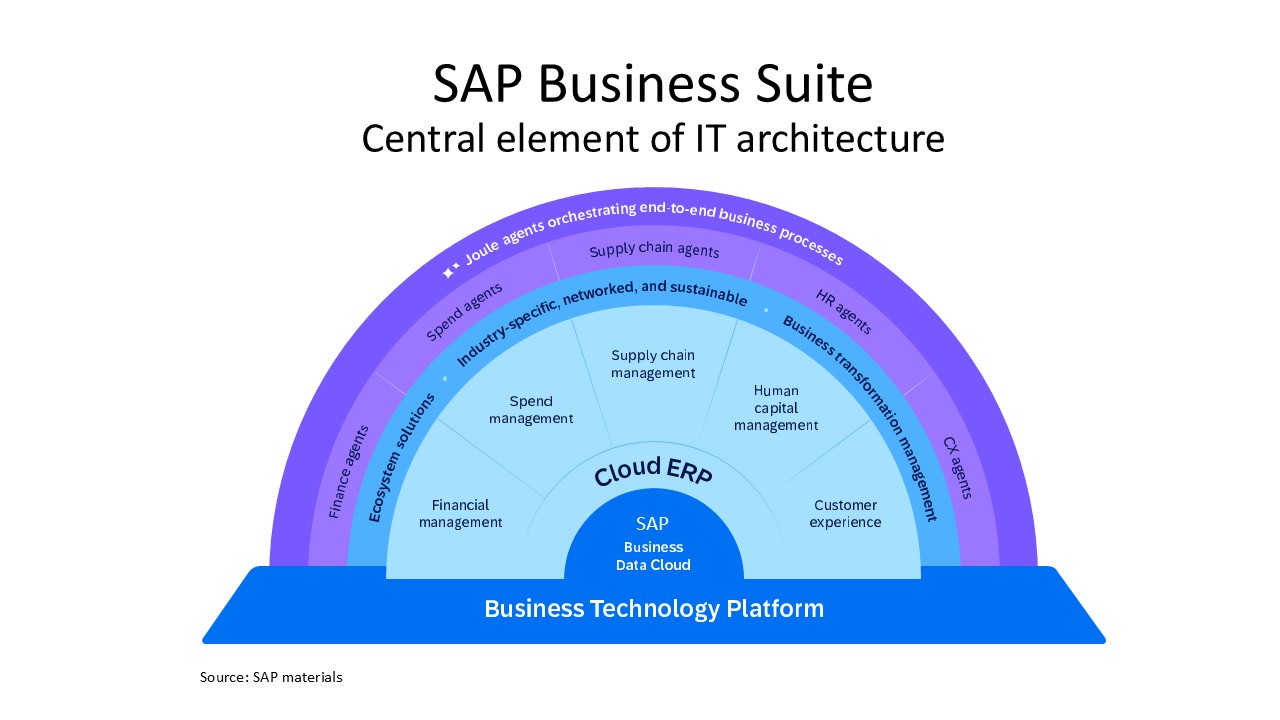
ERP at the heart of the SAP architecture - let's clarify the concepts related to SAP Business Suite
Today, an ERP system no longer operates as a standalone island. SAP’s communications increasingly paint a broader picture: the SAP Business Suite, in which ERP is a central component of the IT architecture. Surrounding it are industry-specific solutions (ecosystem solutions) provided by SAP partners, transformation tools—including business automation solutions that support digital transformation in companies—and, of course, numerous AI agents. The technological foundation is the SAP Business Technology Platform, and data analytics is managed by the SAP Business Data Cloud.
In this context, it’s worth considering SAP Cloud ERP Private, SAP S/4HANA on-premise, RISE with SAP, and GROW with SAP. Because, in practice, the discussion isn’t just about the product name itself. It’s about the model an organization wants to use to develop and maintain its SAP environment.
SAP Cloud ERP Private is the current name for the solution formerly known as SAP S/4HANA Cloud, Private Edition. (Hereinafter, we will use the name SAP Cloud ERP Private.)
The benchmark is SAP S/4HANA on-premise. This is a model in which the organization, its IT team, and its partners are responsible for most of the environment: infrastructure, technical operations, system maintenance, and the coordination of multiple vendors.
RISE with SAP isn’t just the name of a system. It’s a migration path for companies that already have SAP ERP and want to modernize their environment by moving to SAP Cloud ERP Private.
GROW with SAP primarily concerns new SAP ERP implementations, most often in the public cloud model. We won’t go into detail on that topic in this article. Instead, we’ll focus on the decision facing companies running SAP ECC or on-premise SAP S/4HANA.
What exactly are we comparing?
The functional scope of the ERP system in both models can be very similar. We’re talking about areas such as finance, purchasing, supply chain, production, sales, services, and asset management.
So the difference doesn’t start with the question, “Is this still SAP ERP?" Yes, we’re still talking about an SAP ERP system based on SAP S/4HANA. The difference lies in the operating model.
In SAP S/4HANA on-premise, an organization must provide for many layers either on its own or with the help of partners. These include, among other things, the data center, infrastructure, operating system, database, backups, monitoring, security, version updates, and technical support.
In SAP Cloud ERP Private, some of these components are included in the subscription. SAP is responsible for specific technical and operational layers. The organization retains responsibility for data, processes, configuration, users, roles, permissions, and the application layer.
That is the crux of the comparison.
Not: “license versus subscription.” Rather: “Which tasks will we handle, which will SAP take over, and how much will it all cost over the next few years?”
Full Use Equivalent: a new approach to user metrics
One of the differences in the SAP Cloud ERP Private model is the user metric. SAP uses the term “Full Use Equivalent," or FUE, in this context.
FUE allows you to convert between different user types in a more flexible way. One FUE corresponds to one “advanced use" user, five “core use" users, or thirty “self-service use" users. Developer Access is calculated differently: one user with Developer Access corresponds to two FUEs. This is an important change for companies accustomed to the traditional licensing model.
In the FUE model, the allocation of permissions can be managed differently. A user who only views data or performs simple self-service tasks does not need to be treated the same as someone with a broad range of responsibilities in finance, controlling, or logistics. In practice, the FUE affects more than just licenses. The number of FUEs also determines the base capacity of the infrastructure and the scope of certain features available under the subscription.
That is why analyzing user feedback should be one of the first steps when comparing models.

What matters most is not only the Total Cost of Investment (TCO), but also the predictability of expenses and the actual scope of services included in the subscription—because this scope is often vague or underestimated in comparative models
What does the SAP Cloud ERP Private subscription include?
In the SAP Cloud ERP Private model, the subscription includes much more than just the right to use the system. It may include, among other things, maintenance and support for SAP software, infrastructure for production and non-production environments, high availability, technical maintenance of the system, technical preparation and deployment of the environment, security tools, certifications, audits, and support from SAP personnel responsible for delivering and maintaining the service.
It is precisely this aspect that is often overlooked in simple cost comparisons.
If we compare only the price of an on-premise license with the price of a subscription, we’ll be missing a large part of the picture. In SAP S/4HANA on-premise, these components are also necessary. They just need to be provided differently: by your own team, a partner, an infrastructure provider, a separate service contract, or additional tools.
In SAP Cloud ERP Private, some of these tasks are bundled into a single subscription model. This does not eliminate the IT department’s responsibilities. However, it does change how they are distributed.
What is the organization's responsibility?
Migrating to SAP Cloud ERP Private does not mean that SAP takes over everything. This is important because IT teams often worry about a “black box.”
The division of responsibilities is clearly defined. SAP is responsible for the technical layer, infrastructure, the SAP HANA database, the operating system, availability monitoring, backups, and some security-related tasks.
There are areas that remain the responsibility of the organization and should not be taken over by the cloud provider. These primarily include data, business processes, and the application-level aspects of system management. The team responsible for the SAP application continues to manage configuration, roles, authorizations, users, access control, compliance with industry and legal requirements, and monitoring of application logs.
In other words: SAP can handle many technical tasks, but it does not manage the organization’s business. It does not define who has access to which processes. It is not responsible for ensuring that user roles are set up correctly. It does not decide how processes should operate. That is still the responsibility of the company and its IT department.
Does SAP have access to business data?
This is one of the most common questions asked by system administration teams. With SAP Cloud ERP Private, an organization receives an isolated system landscape. SAP manages the infrastructure and the technical layer, but does not have default access to the business data processed in the system.
Access to an organization’s environment is granted through the application layer and requires authorization. This is similar to many current support scenarios, where an SAP expert needs access to analyze a specific support ticket.
In this SAP model, SAP manages, among other things, the administrative client, infrastructure, operating system, database, and technical layer. Business data, including personal information, remains with the organization.
This distinction is important. The cloud does not mean that the provider “sees everything.” It refers to a different model of technical management of the environment.
In what ways is on-premises SAP S/4HANA often underestimated?
TCO analyses often reveal one common problem: the on-premises model is sometimes calculated too narrowly. The comparison typically includes licensing, maintenance, and basic infrastructure. But it doesn’t always account for everything that actually needs to be maintained.
With on-premise SAP S/4HANA, you also need to factor in the full costs of the technical team, maintenance of production and non-production environments, security tools, audits, certifications, backups, monitoring, version updates, managing multiple vendors, and the time spent by IT staff.
That doesn’t mean that on-premise is always a bad choice. It just means you have to evaluate it fairly.
In analyses conducted by SAP, SAP Cloud ERP Private showed a 20–30% lower TCO over a five-year period compared to on-premise SAP S/4HANA. This is not a one-size-fits-all promise for every company. It is the result of specific analyses and specific assumptions.
That’s why it’s a good idea to prepare a comparison tailored to your own environment.

SLA, backups, and availability
In SAP Cloud ERP, the Private SLA covers the entire solution stack. It’s not just about the availability of a single infrastructure component, but about responsibility for the SAP application, the SAP HANA database, the operating system, and the infrastructure.
The standard SLA for production systems is 99.7%. There is also an option to increase this to 99.9%.
In addition, there are high-availability mechanisms that reduce the risk of outages caused by the failure of individual components. Disaster recovery is offered as an option and applies to major incidents affecting the primary location or region.
Backups are also important. The standard policies for SAP Cloud ERP Private specify online backups, retention periods based on system type, and backup replication. The parameters may vary for production and non-production systems.
For IT, this means one thing: it’s not enough to simply ask whether backups exist. You need to know the backup process, the retention policy, what high availability entails, when disaster recovery is needed, and who is responsible for it.
Version updates and technical fixes
In SAP S/4HANA on-premise, version upgrades are the responsibility of the organization. You must plan, prepare, and implement the upgrade yourself or have a partner do it. You must also run tests and ensure that business processes are functioning correctly.
In SAP Cloud ERP Private, the model is different. The technical aspects of version updates are handled by SAP as part of the subscription, but the IT team still plays an important role. It is the organization that initiates the update and agrees on the maintenance window. It is the organization’s responsibility to verify business processes, custom code, extensions, integrations, and the system’s proper functioning after the update.
The same applies to technical fixes. SAP performs specific tasks at the technical level, but the IT department continues to manage changes to the application and is responsible for their business impact.
This is not a “SAP does everything” model. It is a model in which SAP handles the technical implementation of certain tasks, but the organization continues to decide on changes to the system and is responsible for their impact on processes. That is why it is important to pay attention to how extensions are built. The more customizations implemented outside the standard and deep within the system, the more difficult subsequent updates may become. Extensions based on the SAP Business Technology Platform and tools such as SAP Build help maintain a cleaner system core—the so-called “Clean Core”—and make it easier to take advantage of new features.
Does filing a service request mean you have to wait?
This question comes up often. Especially in technical teams that are used to a simple model: “I go to the infrastructure person and ask for a quick change.”
In SAP Cloud ERP Private, a formal service request is required. This is not because SAP wants to prolong the process, but because changes to the environment must be controlled, auditable, and compliant with security requirements. However, this does not mean that every issue begins with an anonymous request followed by waiting without any context. The support model includes specific roles responsible for delivering and managing the service. Changes can first be discussed at the operational level, and the request formalizes the process.
This is an important distinction. A service request does not replace direct contact with the team. It is a record of a process that must be in place for the sake of audits, security, and change control.
Safety: scale matters
When discussing SAP Cloud ERP Private, security isn’t just an added feature. It’s one of the key factors in the comparison.
SAP manages a large number of cloud systems across many industries. This enables vulnerabilities, incidents, and attack patterns to be analyzed on a large scale. Insights gained from one location can be used to strengthen security in other environments.
In the private cloud model, some security tasks are handled by SAP. These include, among other things, infrastructure security, technical monitoring, vulnerability management, platform protection, incident response, and business continuity. This does not mean that the IT department no longer has any responsibilities. It remains responsible for roles, users, authorizations, application logs, data access, and compliance with its industry-specific requirements.
However, some of the tasks that must be handled independently in the on-premise model are managed as part of SAP’s broader security framework in SAP Cloud ERP Private.
SAP Cloud ERP Private or SAP S/4HANA on-premise?
First, it’s a good idea to organize the architecture. Then, the users. Next, responsibility. Only then should you compare costs.
Before making a decision, here is a list of questions for SAP managers, IT heads, SAP Basis specialists, SAP administrators, and those responsible for system maintenance:
- Are we comparing just the license, or the entire business model?
- Do we know the current user structure and the possible Full Use Equivalent allocation?
- Do we know how much the infrastructure, system maintenance, security, and backups actually cost?
- Have we included audits, certifications, monitoring, and security tools?
- Do we have a plan for version updates in the coming years?
- Do we know who is responsible for the application, data, roles, and permissions?
- Have we calculated the cost of managing multiple suppliers?
- Are we comparing the same level of SLA, high availability, disaster recovery, and support?
Because the decision on an ERP model doesn’t end on the day the contract is signed. It affects how the system will be maintained in the years to come.
Let's compare a specific scenario
There is no one-size-fits-all solution. The situation is different for an organization that is still running SAP ECC and planning a migration. It’s different for a company that already has SAP S/4HANA on-premise. It’s different for a team with extensive SAP Basis expertise, and it’s different for an IT department that outsources most of its technical services to partners.
Therefore, the best next step is to analyze a specific scenario.
It’s worth comparing SAP Cloud ERP Private and SAP S/4HANA on-premise based on your number of users, current infrastructure, maintenance costs, security requirements, upgrade plans, and the scope of services currently performed by your IT team or external providers.
Only then can you see what the subscription actually includes, what costs the organization bears, and what the TCO looks like over the next few years.
Aleksander Rybicki, SAP RISE Sales Account Executive for Poland and the Czech Republic, SAP Poland
Cost analysis of various SAP operating models
Would you like to compare migration scenarios for your organization? Let’s discuss a comparison of SAP Cloud ERP Private vs. SAP S/4HANA on-premise. Drawing on many years of experience in cloud migration projects and the delivery of SAP Managed Services—which cover the full range of professional administration and support services—All for One consultants help their clients prepare a TCO analysis for the implementation and maintenance of SAP systems across various models.
Please use the contact form below to request more information.